




Meta Description:
Learn how to identify a Coinbase email scam, protect your crypto assets, recognize phishing attempts, and recover quickly if you’ve been targeted. This comprehensive guide covers warning signs, real examples, prevention tips, and security tools.
Introduction
Imagine starting your day by checking your inbox and seeing an email from Coinbase. The subject line reads, “Urgent: Your Account Has Been Locked.” Your heart races. The email looks professional, includes the Coinbase logo, and warns that your account will be suspended unless you verify your identity immediately.
Many people click the link without thinking twice.
Unfortunately, this is exactly how a Coinbase email scam works.
Cybercriminals know that fear and urgency make people act quickly. They create fake emails that closely resemble legitimate Coinbase communications. Their goal is simple: steal your login credentials, personal information, or cryptocurrency.
As cryptocurrency adoption continues to grow, phishing attacks have become more sophisticated. Understanding how these scams work is one of the best ways to protect your digital assets.
This guide explains everything you need to know about Coinbase email scams, including common tactics, warning signs, prevention strategies, recovery steps, and the best security tools for keeping your crypto safe.
Executive Summary
Here’s what you’ll learn in this guide:
- What a Coinbase email scam is
- How phishing emails trick users
- The most common scam techniques
- Warning signs to watch for
- Steps to verify legitimate Coinbase emails
- Best practices to secure your account
- Useful security tools for crypto users
- What to do if you’ve already clicked a phishing link
What Is a Coinbase Email Scam?
A Coinbase email scam is a phishing attack where scammers send fake emails pretending to be Coinbase.
Their objective is to convince victims to:
- Reveal account passwords
- Enter two-factor authentication codes
- Download malware
- Approve fake transactions
- Share recovery phrases
- Transfer cryptocurrency
These emails often copy Coinbase branding, making them appear authentic at first glance.

Why Are Coinbase Users Targeted?
Coinbase is one of the world’s largest cryptocurrency exchanges.
Millions of users trust the platform to buy, sell, and store digital assets.
Because of this popularity, scammers frequently impersonate Coinbase to target both new and experienced investors.
Common reasons include:
- Large user base
- Valuable crypto holdings
- Growing adoption
- Limited cybersecurity knowledge among beginners
Common Types of Coinbase Email Scams
1. Fake Security Alert
These emails claim your account has been compromised.
Typical subject lines include:
- Your account has been locked
- Suspicious login detected
- Verify your account immediately
The email urges immediate action to create panic.

2. Fake Account Verification
Scammers claim Coinbase requires identity verification.
Victims are directed to fake login pages that steal credentials.
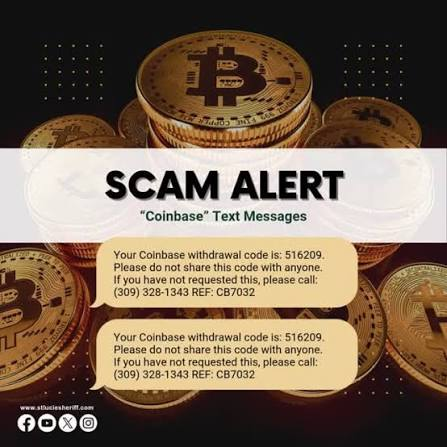
3. Fake Withdrawal Notification
You receive a message saying cryptocurrency has been withdrawn.
The email encourages clicking a “Cancel Transaction” button.
Instead, it sends you to a phishing website.
4. Fake Prize or Giveaway
Scammers promise:
- Free Bitcoin
- Free Ethereum
- Free USDC
- Bonus rewards
Legitimate companies rarely distribute cryptocurrency through random email promotions.
5. Fake Customer Support
Some emails instruct victims to call fraudulent support numbers.
The scammer then convinces users to install remote access software or reveal sensitive information.

Warning Signs of a Coinbase Email Scam
Watch for these red flags:
Poor Grammar
Many phishing emails contain awkward wording or spelling mistakes.
Urgent Language
Examples include:
- Act now
- Immediate action required
- Your account will be suspended
Scammers create urgency to reduce careful thinking.
Suspicious Links
Always inspect links before clicking.
Fake websites often use domains that closely resemble legitimate ones.
Requests for Sensitive Information
Legitimate companies generally do not ask for:
- Passwords
- Recovery phrases
- Authentication codes
via email.
How to Verify a Coinbase Email
Before responding:
- Check the sender’s email address carefully.
- Visit Coinbase directly by typing the website address into your browser.
- Log in from the official website instead of clicking email links.
- Review recent account activity.
- Contact official customer support if you’re unsure.
What Happens If You Click a Scam Email?
Clicking alone doesn’t always compromise your account.
However, danger increases if you:
- Enter login credentials
- Download attachments
- Approve transactions
- Share your recovery phrase
If this happens, act immediately.
What Should You Do If You’ve Been Scammed?
Follow these steps:
Step 1
Change your Coinbase password immediately.
Step 2
Enable two-factor authentication if it’s not already active.
Step 3
Review recent account activity.
Step 4
Move remaining cryptocurrency to a secure wallet if appropriate.
Step 5
Contact Coinbase support using official channels.
Step 6
Report the phishing email to help prevent future attacks.
Best Security Tools
| Tool | Purpose | Best For |
|---|---|---|
| Coinbase Authenticator | Account security | Everyday users |
| Google Authenticator | Two-factor authentication | Secure logins |
| Authy | Multi-device authentication | Backup access |
| Ledger | Hardware wallet | Long-term storage |
| Trezor | Cold wallet | Offline security |
| Malwarebytes | Malware detection | PC protection |
| Bitdefender | Antivirus | Real-time protection |
| Proton Mail | Secure email | Privacy-focused users |
Best Practices
Protect yourself by following these habits:
- Never share your recovery phrase.
- Enable two-factor authentication.
- Use strong, unique passwords.
- Verify every email before clicking.
- Keep software updated.
- Store large crypto holdings in hardware wallets.
Common Mistakes
Avoid these errors:
- Trusting every email.
- Clicking unknown links.
- Reusing passwords.
- Ignoring security alerts.
- Leaving large balances on exchanges.
Frequently Asked Questions
Is every Coinbase email a scam?
No. Coinbase sends legitimate emails, but you should always verify the sender and avoid clicking unexpected links.
Can scammers copy the Coinbase logo?
Yes. Logos and branding are easy to copy, so appearance alone does not prove an email is genuine.
Does Coinbase ask for my recovery phrase?
No. Legitimate support will never ask for your wallet recovery phrase.
What should I do if I entered my password?
Change it immediately, enable two-factor authentication, and review your account for unauthorized activity.
Can antivirus software stop phishing?
It can help block malicious websites and downloads, but it cannot replace cautious online behavior.
Conclusion
A Coinbase email scam can look convincing, but careful attention to detail can help you avoid becoming a victim. By recognizing common phishing tactics, verifying emails through official channels, using strong authentication, and keeping your devices secure, you can significantly reduce your risk.
Cryptocurrency offers exciting opportunities, but it also requires personal responsibility. Treat every unexpected email with caution, double-check before taking action, and remember that protecting your digital assets starts with informed decisions. Staying alert today can prevent costly mistakes tomorrow.